












On Tuesday, Apple began testing a set of potentially controversial audio intelligence features in the first developer test versions at iOS 27.3 and watchOS 27.3. These test versions bring four new AI features that allow Apple Watch Series 12 users to identify important sounds, recognize songs, review conversations, and take notes.
After using the Siri Recaps function on my Apple Watch for just one day, I can already see that its ultimate practical value may exceed the slight “creepy” sensation brought by AI audio recording and summarization. However, I also noticed that AI’s assistance in taking notes might be going a bit too far—it records some content that isn’t worth remembering, and there is room for improvement.
The first two functions, namely voice and song recognition, do not pose potential privacy issues; they are used to identify important sounds such as alarms or doorbells, or to recognize songs with the help of Shazam technology. The former helps users with hearing impairments to better perceive their surroundings, while the latter is something we have been doing with iPhone for nearly twenty years.
What truly raises concerns are two other features: Live Rewind and Siri Recaps. They record and transcribe, or summarize, the conversations that occur around the wearer of Apple Watch. Live Rewind allows you to review what was said in the past 15 seconds, while Siri Recaps summarizes the audio content of your day, saving those words that are considered important.
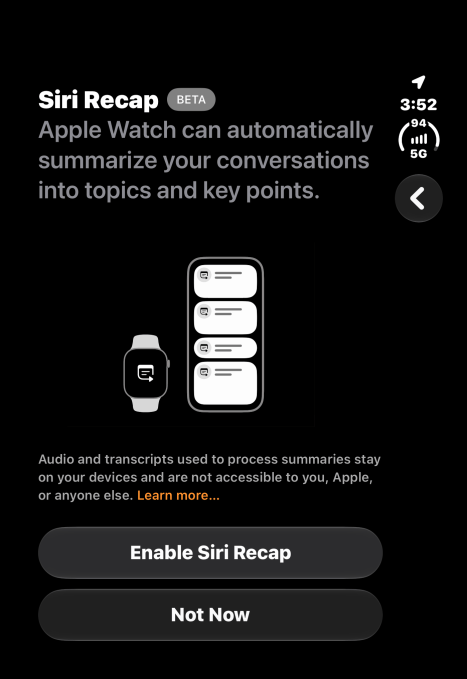
Apple has taken numerous measures in terms of privacy: it processes audio on the device as much as possible and runs the AI model, which does not identify speakers, does not store original audio files, and also obscures private information such as government ID numbers or personal account details.
Nevertheless, there are still people who feel uncomfortable with the normalization of the notion that "technology is always listening."
I can understand both viewpoints. I often marvel at how technology has permeated every aspect of our daily lives, yet I still see the value in the features that Apple offers.
I haven't found the right moment to test Live Rewind yet, and I also don't think it will be a feature that I will use frequently. If I miss something, I'm more likely to say "Sorry, what?" or "Can you repeat that?" first, before turning to Apple Watch for help.
But for Siri Recaps, I immediately saw that it could become a feature I would rely on daily, to save important notes for future reference.
Yesterday, I tested this feature in a real-life scenario: we took our teenager’s car for repairs and then went to pick up a rental car. At both places, the staff provided a lot of information verbally, including schedule, prices, and policies. The information came so quickly that there was no time to stop and take notes. But when I looked back at Siri Recaps later that day, it had already captured the key details that I might need to refer to later on.
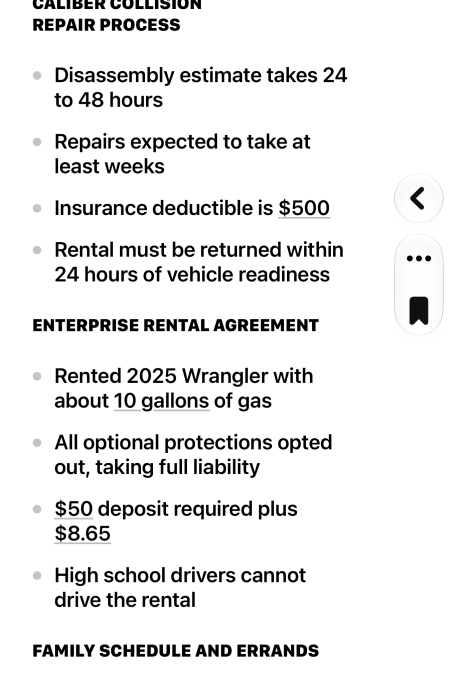
For example, it records the deductible, the time range for repairs, how much fuel was in the tank at the start of renting the car, and other information I want to remember.
However, I also have a complaint: Siri Recaps has mixed these pieces of information with other topics discussed later at home, such as a task we need to accomplish and when this week we need to take care of the children – these are matters we were discussing regarding creating appointments in our family calendar with appropriate reminder times.
I think these contents should have been saved separately as a note titled “Family Schedule and Miscellaneous Matters,” rather than being placed in the same note as car maintenance details, although they are divided under different headings.
Because I set Siri Recaps to run continuously, it also records some less important things, such as our "plans" to watch the mid-term election coverage on TV – this kind of content is usually not something you would deliberately note down. It also made me clearly realize that this function has indeed been listening to our daily conversations all the time. If the topics of discussion are more private, this feeling might be perceived as a violation of privacy in different situations.
This made me start to consider whether I should turn off the Recap function when I stay at home at night, so that the casual conversations at the family dinner table won't turn into material for notes.
Although I am very grateful to Recap for capturing a task reminder that I needed to handle from our family conversations, the other miscellaneous information they saved—such as what TV shows we were watching—is only valuable when you export the notes from Siri Recap to Apple’s Journal app, because those are things you wanted to record for personal reasons.
I hope that such unnecessary details can be saved separately as independent notes, or at least as a dedicated section, and that they can be exported or deleted separately at the end of the day.
I also hope to be able to simply swipe left on a single bullet point to remove it from Siri Recap, instead of having to enter edit mode, place the cursor there, and then start deleting the text I don't need.
I also hope there would be an option that allows you to automatically export any saved Siri Recap items – that is, those you save by clicking the bookmark icon – to Apple’s Notes app, without having to perform an additional manual step.
These Recaps allow you to create your own folders within Notes, which makes it easier to find things. I can understand why this isn't the default option; after all, applications like Notes are used in many different ways by people. However, for those who wish to use Notes as a central hub for all their notes and to-dos, this feature would be very useful.
Although I didn't immediately accept the idea that "my watch is constantly listening" at first, I did see the value of this automatic note-taking method in daily life.