

















Google has introduced a new password manager switching feature in Android. Users no longer need to export CSV files when switching applications. The new process also supports the migration of passkeys, reducing duplicate setup steps and lowering the risks associated with file leaks.
No need to export the CSV file.
According to Google, when users open a new password manager, they can directly choose to import or copy passwords from an existing application. Android will identify the password manager application on the device and coordinate the transfer process between the two applications.
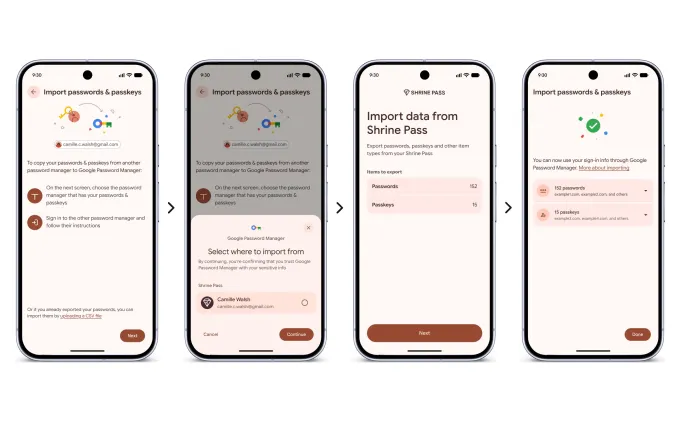
Users can view the content to be transferred before the transfer and complete confirmation with several clicks. Google claims that this method also reduces the risk of data exposure associated with CSV files during export, saving, or transmission processes.
The passkey can be migrated synchronously.
This update covers not only traditional passwords but also passkeys. For users who have already logged in to the service using passkeys, there is no need to re-set each item individually after switching to a new password manager, which helps to lower the barriers to migration.
As more platforms promote password-free login, the portability of passkeys has become even more important. This time, Google has integrated the relevant process into the Android system layer, making switching between different password managers closer to a system-level experience.
First batch supports three applications
Google stated that this new feature has already been launched in some partner applications as well as in Google's own password manager. The applications that currently support it include 1Password, Bitwarden, and Dashlane; it will be extended to more applications in the future.
This feature will be available to all devices running Android version 8 and above.